Gleipnir Download

A whole team
of AI coders,
running in minutes.

Gleipnir runs coding agents - a manager, coders, a tester - in one window. It installs Claude Code if it's missing, briefs each agent on its job and its crew, and shows you which one is waiting on you.

Download Gleipnir

Free · macOS and Windows · Installs Claude Code if it's missing

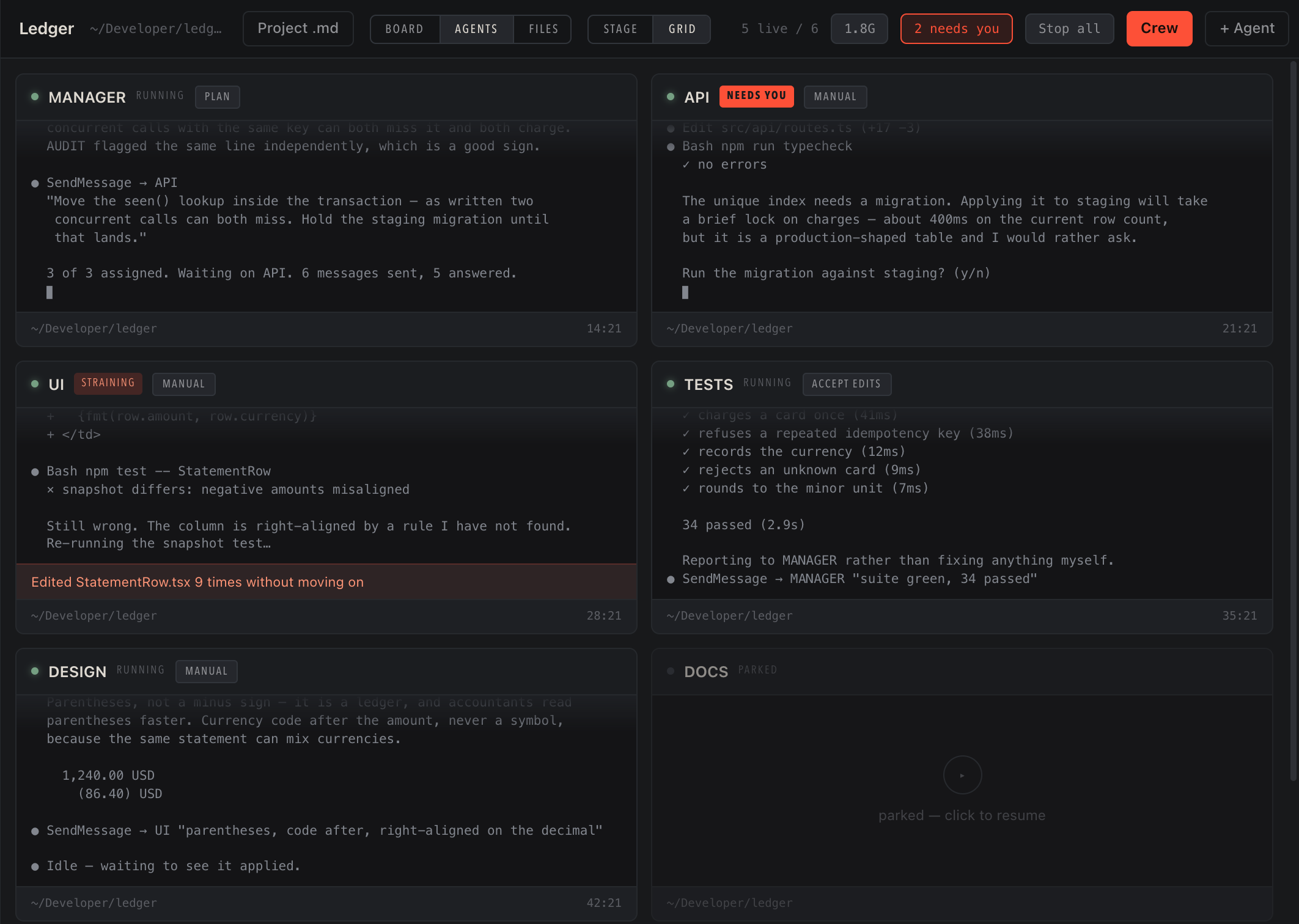
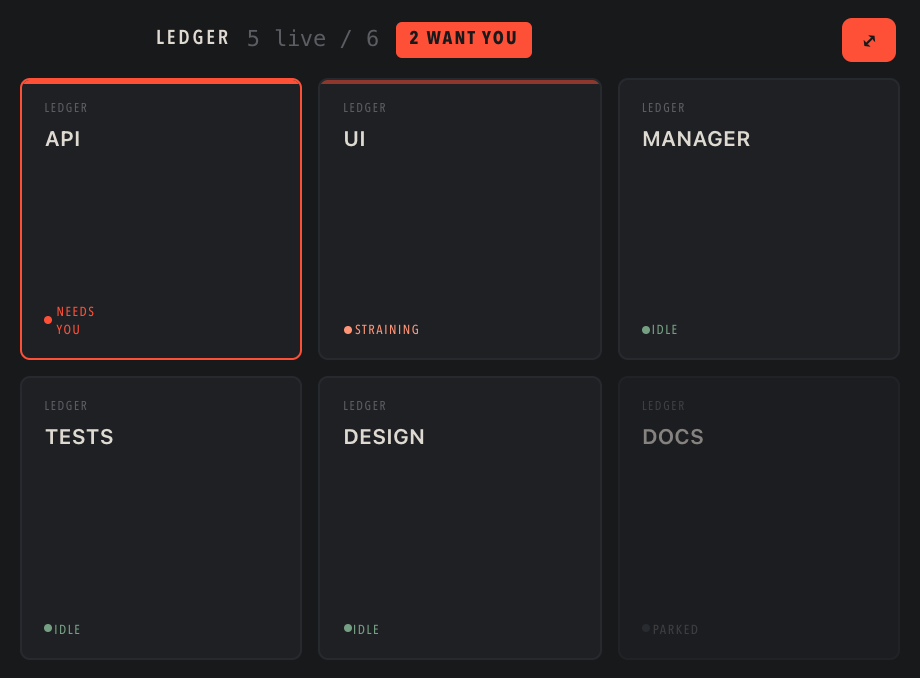
Gleipnir with six agents running in one project. API is blocked on a yes-or-no question, UI is flagged for rewriting the same file nine times, DOCS is parked.

Six agents, one project. API is waiting on a yes-or-no. UI has rewritten one file nine times and is flagged for it. DOCS is parked and costing nothing.

Real CLIs in real pseudo-terminals - no API, no wrapper. With Claude Code it goes further: Gleipnir reads the files Claude Code already writes, so it sees sessions it didn't start, including the one in your terminal.

Codex and Gemini CLI take full seats in the fleet: spawned, typed at, given a model, parked and resumed, grouped into the same projects, and reachable by a crew broadcast or a job like anything else.

The file wall, strain and usage are built on Claude Code's transcripts, so those stay dark for the others. The audit doesn't care - it reads your project, not your agents, and works the same whatever wrote the code.

One AI coder is a conversation. A team of them builds something.

The problem is that a team needs somebody running it - deciding who does what, noticing who is stuck, keeping them out of each other's way. That is the part that stops people trying. Gleipnir is that part.

It holds all of them in one window, grouped into projects that close and reopen with every agent still running. The sessions and transcripts are ordinary Claude Code ones - resumable from a plain terminal, with or without Gleipnir.

Three steps,
then it is running

No account to make and no configuration file to write. Gleipnir drives the terminal parts itself.

1 · Open it

If Claude Code is not installed, Gleipnir installs it and walks you through signing in - two steps with ticks that fill in as they pass. You need a Claude account to sign in with; that is the one thing it cannot do for you.

the official installerrun for you, inside the app

2 · Point it at a folder

That folder is a project. Any folder works - git repository or not, empty or not.

any folderno repo required

3 · Add your crew

Pick roles from a list. Each agent starts knowing what its job is and who its teammates are, so the manager hands work out instead of quietly doing all of it.

six roleseach one briefed at start

Other CLIs bring their own setup. Install Codex or Gemini yourself and Gleipnir finds them.

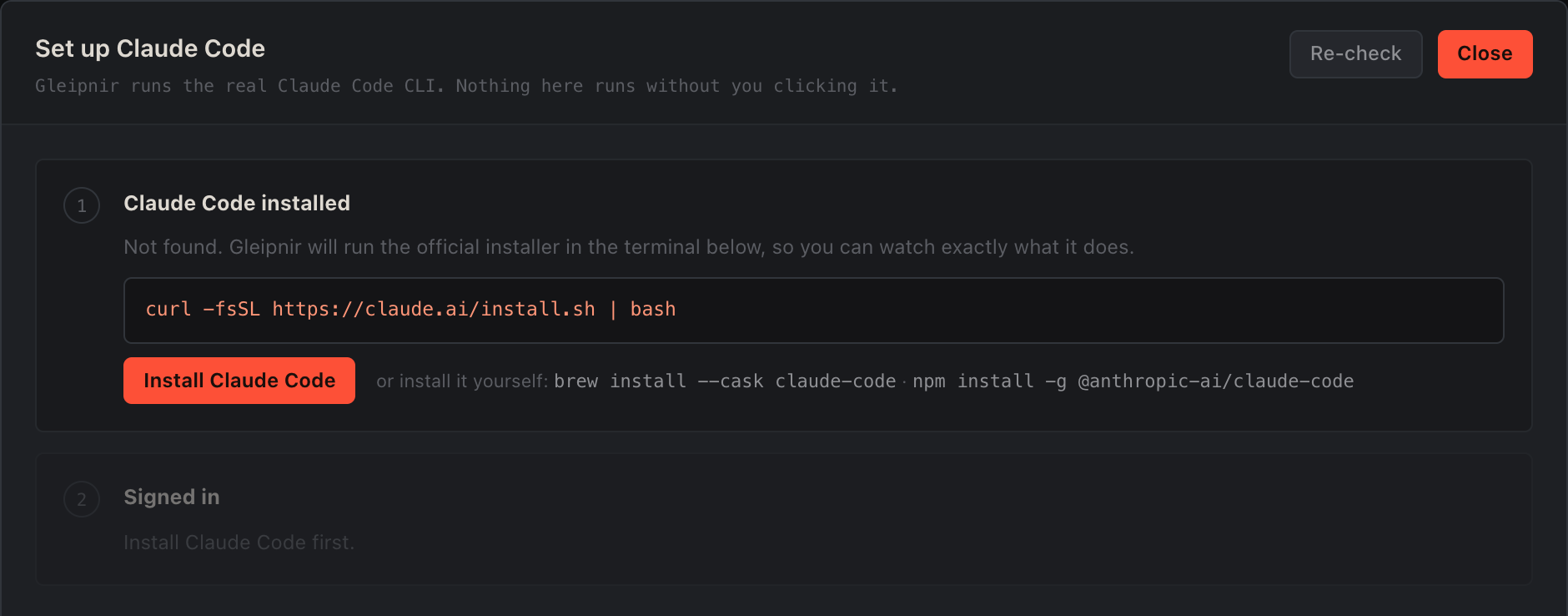
Gleipnir's setup sheet on first run: step one, Claude Code installed - not found, with an Install Claude Code button; step two, signed in, waiting on the first.

What you see the first time you open it, if you do not have Claude Code. It says what is missing, shows you the exact command it is about to run, and waits for you to click. Nothing runs on its own.

You pick the jobs.
It briefs them.

Six roles. Gleipnir tells each agent what its job is, who its teammates are, and when to hand work over rather than doing it itself.

Manager

Plans the work and hands it out. Does not do it all itself.

Coder

Writes the work.

Designer

Decides how it looks and behaves, before anyone builds it.

Tester

Runs the checks and reports pass or fail.

Reviewer

Reads the changes and flags problems.

General

Whatever you point it at.

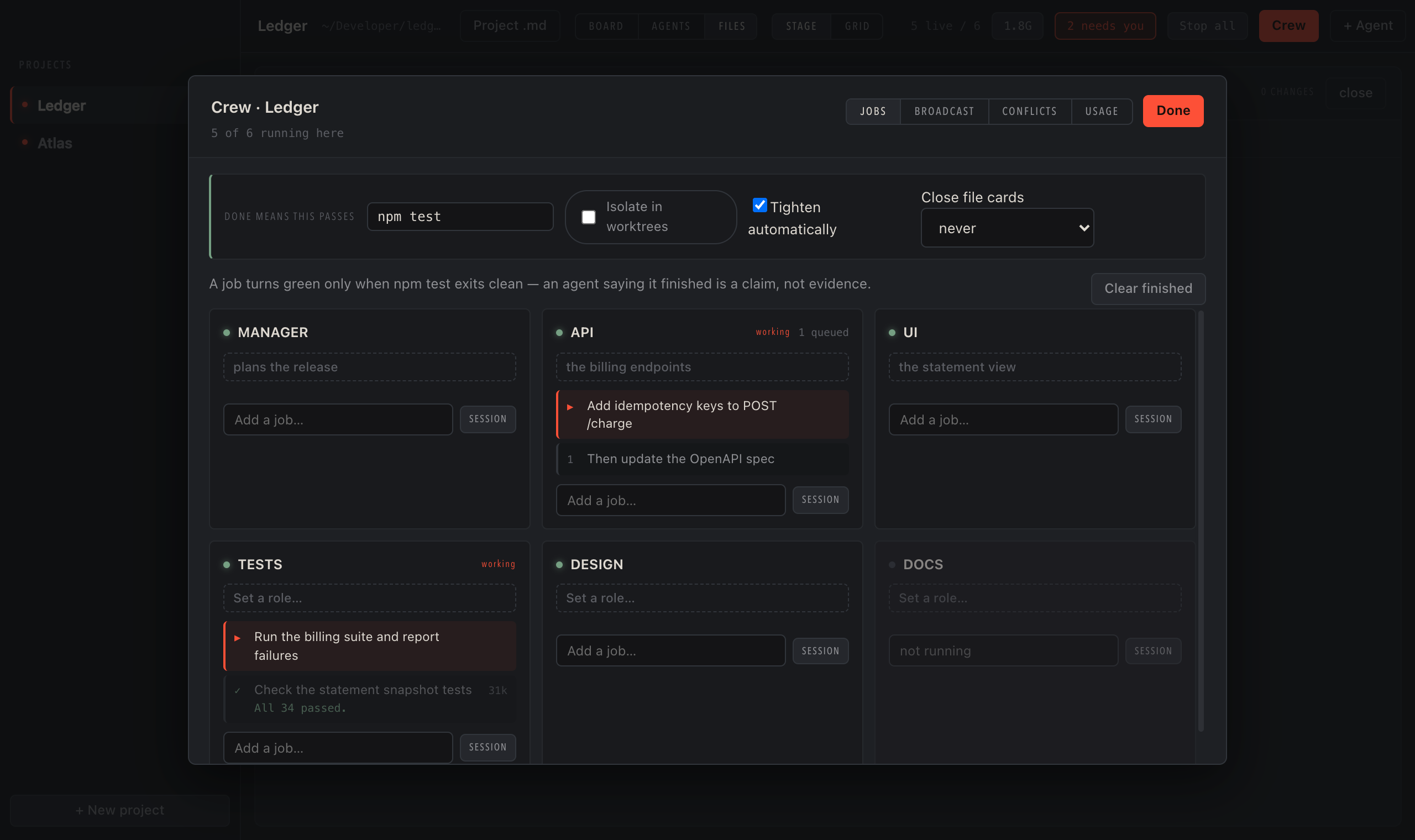
The crew panel: six agents, each with its role and the job it is working on.

The crew, with a job each. A job only turns green when your own test command passes - an agent saying it finished is a claim, not evidence.

It also picks the right model for each role. Manager on Opus at high effort, coder on Sonnet, tester and reviewer on Haiku at low. The defaults are where the money goes, so they ship already set. All of it is changeable later.

And when one
goes wrong

Agents get stuck, tread on each other, and build things that are not safe to put on the internet. These are the three that cost real money or real trouble.

It watches for the expensive mistake

An agent that edits the same file nine times and gets nowhere is about to cost you real money. Gleipnir spots that pattern and flags it - and if you switch it on for a project, parks that agent for you.

the last sixty tool callsparking is opt-in, per project

It knows who changed what

When several agents work in one folder, the app shows you which one touched which file, and when. Git can tell you a file changed; it cannot tell you which agent changed it.

what each agent didworks with no repo at all

It checks what you built

Before you put something on the internet, Gleipnir reads your project for the mistakes that bite - keys left where a browser can read them, database tables anyone can open. It quotes the exact line, and hands the fix to an agent.

your files, in about 100msfree, and it changes nothing

What it looks like
with six agents up

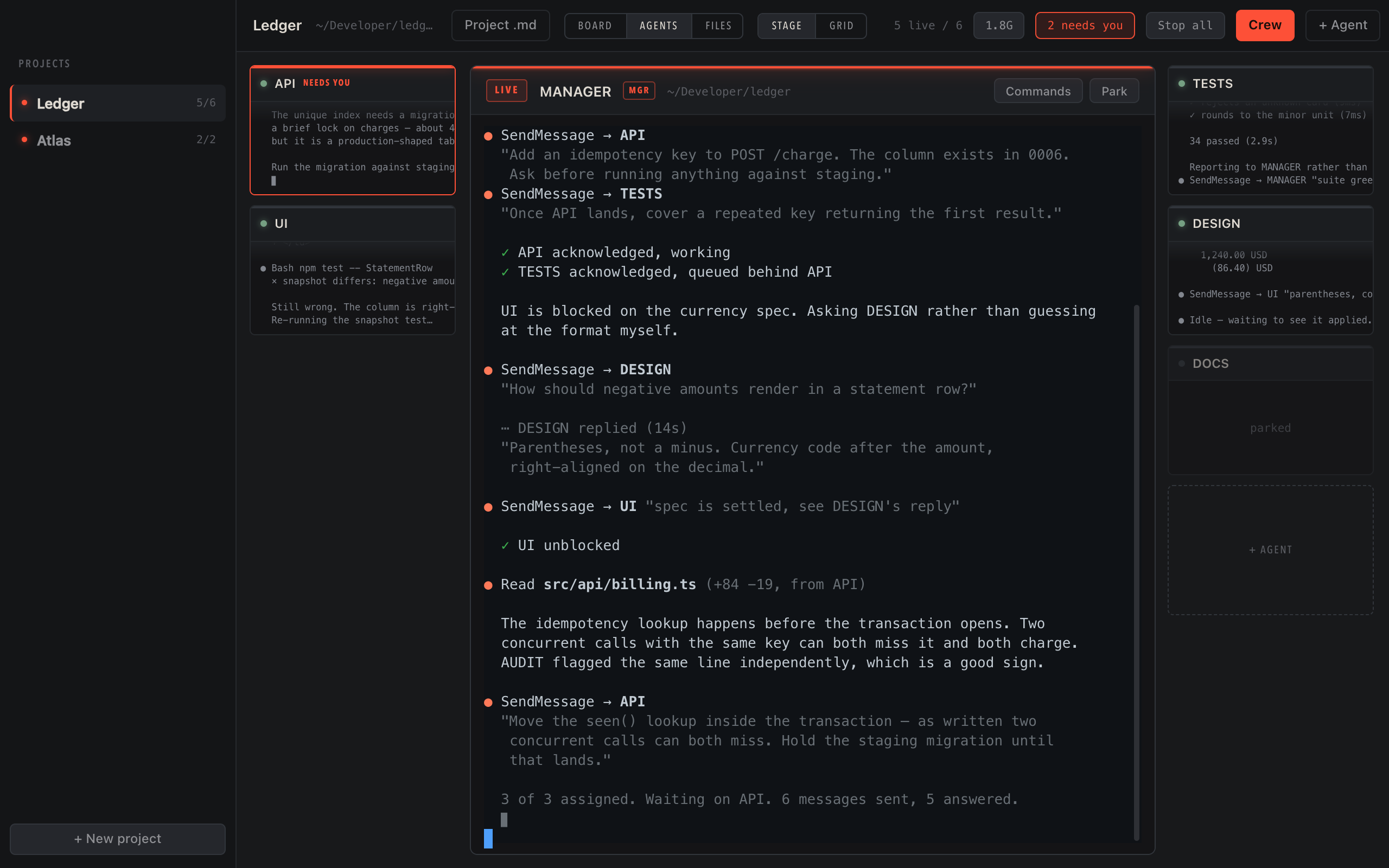
One agent large in the centre with a live terminal, the rest alongside as smaller tiles.
A column per agent with the files each is changing stacked beneath.
One file's changes in order, each block labelled with the agent that made it.
A small floating panel of square tiles, one per agent, showing state only.
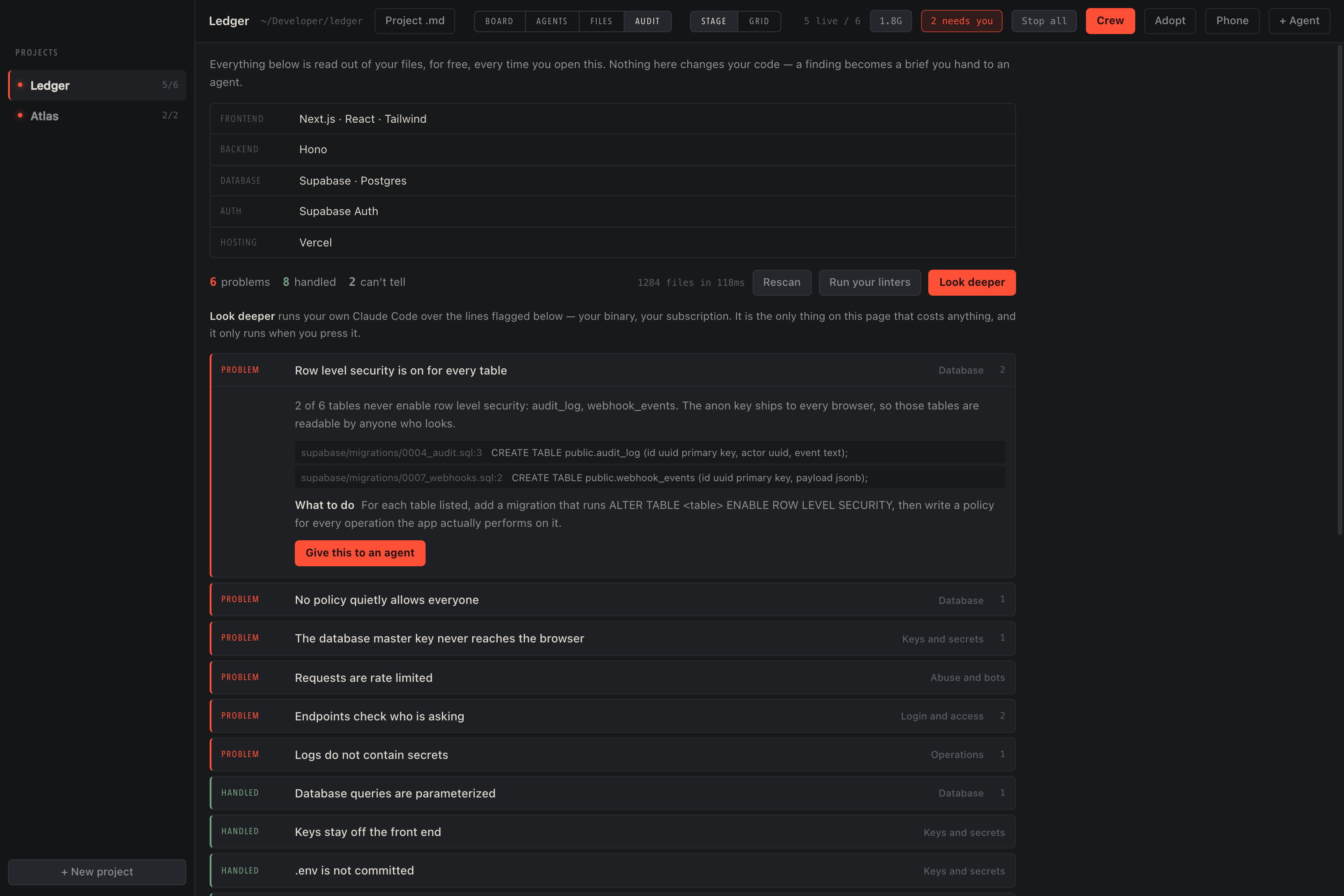
The audit view: the detected stack, then a list of checks marked problem, handled or can't tell, with the failing lines quoted underneath.

The one you are working with is front and centre and fully interactive - a real terminal, not a transcript. The rest keep running beside it.

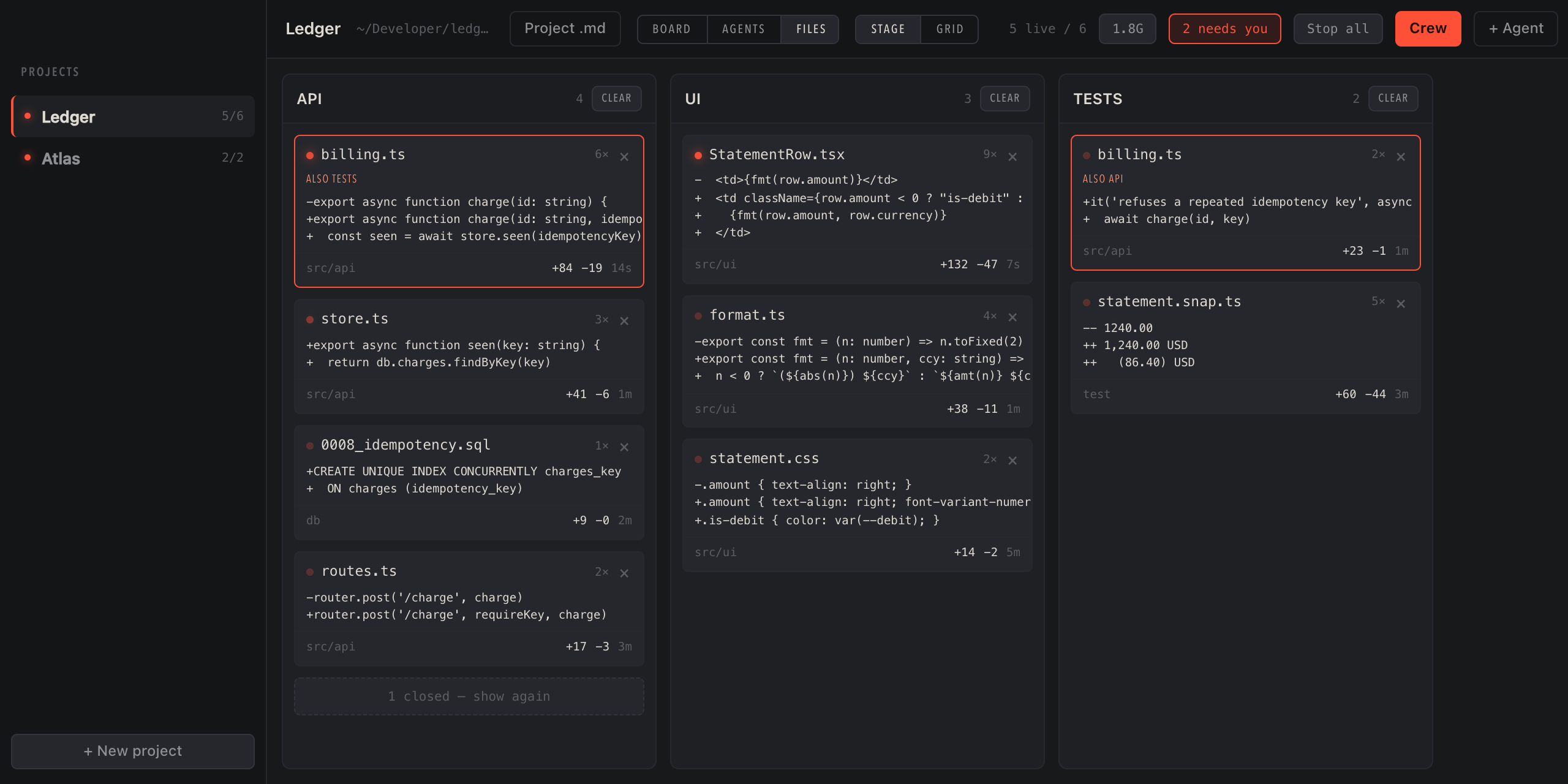
The same fleet by what it is changing. billing.ts sits in two columns at once, flagged in both. Git can tell you a file changed; it cannot tell you which agent changed it.

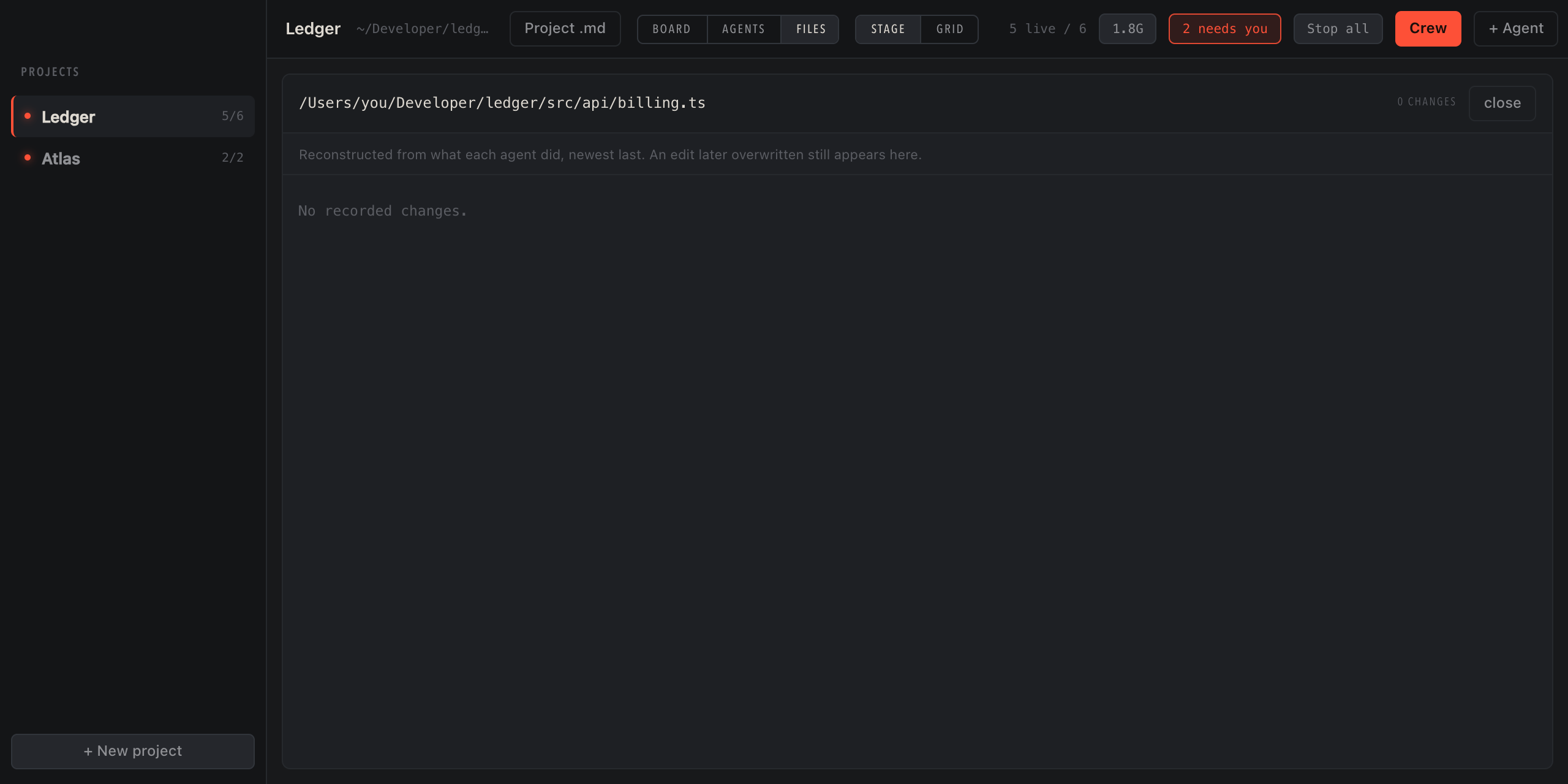
One file, every change, in order - each block stamped with the agent that made it and when.

Shrink the whole window to a small floating panel of states and leave it in a corner. Click any tile to open that agent and talk to it.

What the agents actually built, checked against the things that bite - here, two tables with row level security off and a policy that quietly allows everyone. Every finding quotes the line, and hands off to an agent to fix.

Ten modules,
one window

Every module is built on something Claude Code already writes to disk. The source is printed on each card, so every claim here is checkable.

Strain

Watches the last sixty tool calls of a running agent for thrashing — the same file, the same test, over and over — and warns before it becomes an invoice.

transcript tail, 512 KBnever a full parse

Fleet

Every session as a tile: working, idle, or blocked on a human. Sessions Gleipnir never started appear on the same wall, read from disk like any other.

~/.claude/sessions/*.jsonpolled at 1 Hz

Jobs

Ask a question without paying for the conversation. A live session re-sends its whole history every turn; a one-shot starts empty, so “did the tests pass” costs a couple of thousand tokens instead of hundreds of thousands.

claude -pruns whether the agent is up or not

Advisor

Names the agent and says what to do about it. UI is re-sending four hundred thousand tokens every turn - fork the session, or start a fresh one and hand it a summary. TESTS is paying full price on input because the cache keeps expiring between bursts. Arithmetic over numbers you already have, not another model's opinion.

arithmetic onlyno extra model call

File wall

One column per agent, files stacked beneath, reconstructed from what each agent actually did. In a shared working copy git can tell you a file changed; it can never tell you which agent changed it.

~/.claude/projects/<slug>/*.jsonlworks with no repo at all

Usage

Real token counts, per agent and per project, priced against the current table. Counted from the transcripts, not estimated — though on a subscription the dollar figure is a size signal rather than a bill.

transcript usage recordsinput · output · cache

Crew

Send one instruction to several agents at once. Anything not running is reported back by name rather than silently dropped.

broadcastcollisions flagged first

Audit

Reads your project, not your agents: keys reachable from the browser, tables with row level security switched off, queries built by hand. Four answers, not two - nothing is shown green because it was not looked at. A finding becomes a brief you hand to an agent.

your files, in about 100msfree, and it changes nothing

Other agents In testing

Codex and Gemini CLI, in tiles. The modules above read Claude Code's own transcripts, so they stay Claude Code only - and the app hides those controls rather than showing settings that do nothing.

its own CLI, in a ptytiles, not deep integration

Remote Coming soon

The machine already serves the fleet over your own network, token-paired and off until you turn it on. The phone app that reads it is still being built.

HTTP + WS on your LANoff by default

No API.
Just the files.

How it works, and what it can't do.

Claude Code writes a heartbeat while it runs and a transcript as it works. Gleipnir reads those. That is the whole mechanism, and it is why the app can see a session it did not launch.

None of this is something Anthropic promises to keep the same, so a Claude Code update can occasionally cost a feature here. It should never cost you the app - every parser is built to come back empty rather than break.

Gleipnir reads your local files and spawns the CLI you already have. There is no account and no telemetry. Nothing of yours leaves the machine — the only thing it asks the network is whether a newer build exists.

The Gleipnir mark: a bound wolf.

Named for a ribbon.

Two iron chains couldn't hold Fenrir. A ribbon could — not by making the wolf weaker, but by giving the gods something to hold him with. It was thin, light, and made to fit the thing it had to hold.

That's the job here. Eight agents aren't too powerful, they're too many to watch. Gleipnir puts all of them in one window and tells you which one has gone off the rails.

Download

Free. You bring your own Claude account - Gleipnir runs the Claude Code CLI under your own login and never sees it.

macOS current

Download for macOS

Apple silicon and Intel in one file · Developer ID signed and notarized

macOS
universal · Developer ID, notarized
Windows
64-bit · not code-signed yet
Claude Code
installed for you if you don't have it
You'll need
a Claude account to sign in with

Windows installer

Windows will warn you

Windows will say it cannot identify the publisher. Click More info, then Run anyway. Signing costs money and it is not done yet - that warning is Windows being right, not something going wrong.

Linux Not yet

Linux support is in development.

Before you open it

Check the CLI is there and signed in. If this prints an account, you are ready.

claude auth status

Using it with a team Coming soon

Several people on one bill, and the shared hub behind it, are still being built. What that will be. The download here is the whole app for one person, free.